Your TV.
Beautifully Organised.
Live TV, Movies, Series, Sports and TV Guide in one premium player. Works with Xtream Codes and M3U playlists — add yours from your phone.
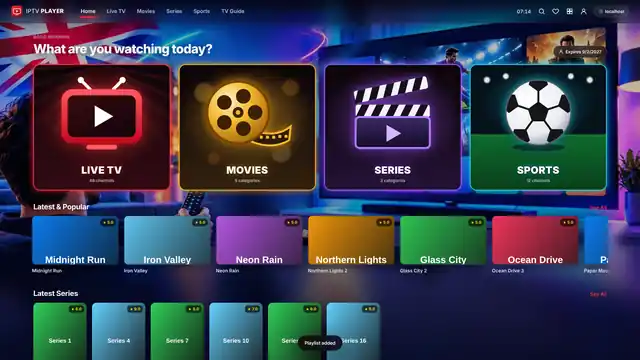
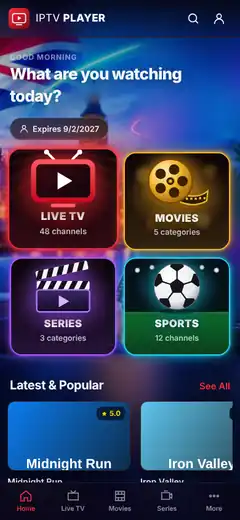
Features
Everything you expect. Nothing you don't.
A player designed for the big screen and the small one.
Live TV with EPG
Now & next info on every channel, right in the list.
Full TV Guide
A smooth, scrollable grid guide with XMLTV support.
Movies & Series with resume
Pick up exactly where you left off, on any episode.
Sports section
All sports channels and events gathered in one place.
Catch-Up TV
Missed it? Rewind supported channels up to days back.
Multi-View (4 screens)
Watch up to four streams at once on one screen.
4K / HDR playback
Hardware-accelerated decoding for crisp, rich picture.
Subtitles & audio tracks
Switch language, subtitles and audio in one tap.
Parental PIN lock
Hide and lock any category behind a PIN.
Favorites & history
Your favourite channels and recently watched, always first.
TV remote friendly
Built for D-pad navigation on Firestick and Android TV.
Multiple playlists
Add several Xtream or M3U playlists and switch instantly.
Screenshots
See it in action
Tap any screenshot to view it fullscreen.
Download
Get IPTV PLAYER on every screen
Free download for TVs, phones, tablets and computers. Add your own playlist and start watching.
Firestick / Fire TV
Fire TV Stick, Lite, 4K, 4K Max, Fire TV Cube, Fire TV smart TVs
Enter this link in the Downloader app:
https://iptv-player-website.vercel.app/downloadAndroid TV / Google TV
Sony, TCL, Philips, Hisense, Sharp, Xiaomi Mi Box, Nvidia Shield, Chromecast with Google TV, any Android box
Android phone & tablet
Samsung, Xiaomi, Oppo, Huawei, Pixel… Android 5.1 or newer
Samsung Smart TV
Tizen TVs 2017 and newer
Install with Tizen Studio (Developer Mode). Easiest: plug in a Firestick.
Download TV packageLG Smart TV
webOS TVs 2018 and newer
Install with the LG Developer Mode app. Easiest: plug in a Firestick.
Download .ipkWindows PC & laptop
Windows 10 & 11 (64 / 32-bit)
If Windows warns you, click More info › Run anyway.
Download for WindowsMac
Intel & Apple Silicon (M1–M4)
First time: right-click the app › Open.
Download for MacLinux
Ubuntu, Mint, Fedora, Debian…
Make it executable, then double-click.
Download AppImageOther Smart TVs
Hisense VIDAA, Roku, Vizio, Panasonic, Philips Saphi…
These TVs can’t install outside apps. Plug in a Firestick or Android TV box and install IPTV PLAYER on it.
iPhone, iPad & Apple TV
App Store version in progress
Setup Guide
Up and running in minutes
Pick your device and follow the steps.
- 1
Home › Find › Search “Downloader” › install.
- 2
Settings › My Fire TV › Developer Options › Install unknown apps › Downloader ON.
- 3
Open Downloader, enter the APK link, press Go.
- 4
Install › Open.
- 5
Note the Device ID and Device Key on the TV, then add your playlist from your phone at Activate TV.
https://iptv-player-website.vercel.app/downloadAdd your playlist
Easiest: from your phone
Open IPTV PLAYER on your TV, then on your phone go to Activate TV, enter the Device ID + Device Key shown on the TV and add your link. It appears on the TV in seconds.
Activate TVXtream Codes
- Server URL
- Username
- Password
M3U
Paste your playlist link.
Tip: pasting a link that contains get.php?username= fills in the Xtream details automatically.
Remote tips
- ArrowsMove
- OKSelect
- BackReturn
- CH+ / CH–Change channel
- NumbersJump to a channel
FAQ
Questions? Answered.
Does the app include channels?
No. IPTV PLAYER is a media player only — it does not include, host or sell any channels or content. You add your own playlist from your provider.
Which formats work?
Xtream Codes (Server URL, Username, Password), M3U / M3U8 playlist links, and XMLTV EPG for the TV Guide.
Is it free?
Yes. IPTV PLAYER is free to download and use on Android phones, tablets, Firestick and Android TV.
Why do I need “unknown apps”?
IPTV PLAYER is installed directly from an APK file rather than an app store. Android and Fire OS ask you to allow “Install unknown apps” for the app you install it with (your browser or Downloader). You can turn it off again after installing.
How do I update the app?
Download the latest APK from this page (the link always points to the newest version) and install it over the current app. Your playlists and settings are kept.
How many devices?
You can install IPTV PLAYER on as many of your own devices as you like. How many devices can stream at the same time depends on your playlist provider.
How do I lock adult categories?
Go to Settings › Parental Control, choose the categories to lock and set your own PIN. The default PIN is 0000 — change it straight away.